

If you want to protect employees working in the browser, you need to get as close to the user as possible. In this Push product guide, we’ll cover how to use in-browser controls to stop attacks before compromise can occur, and to guide users to remediate vulnerabilities — all using your custom branding to increase trust.
If you want to protect employees working in the browser, you need to get as close to the user as possible. In this Push product guide, we’ll cover how to use in-browser controls to stop attacks before compromise can occur, and to guide users to remediate vulnerabilities — all using your custom branding to increase trust.
Here are two things that can’t both be true:
Users are the weakest link in security. They just need to stop clicking on things.
The internet is a giant clicking-on-things machine.
In particular, when we look at the TTPs of modern browser-based attacks that target employees, it’s obvious where this disconnect has real consequences.
Crowdstrike reports that valid account abuse accounted for 35% of incidents in 2025, while Verizon reports that identity is now the primary breach vector observed across all methods.
Here’s why: Security tooling hasn’t kept up with adversary advances, and normal human behaviors are being expressly targeted via the browser to achieve compromise of accounts and endpoints. If you list the pitfalls facing the common end-user encountering these kinds of attack methods, the picture becomes even more stark.
To solve these problems, you need security tooling that sits in line with the user where they’re already working: In the browser. In this Push product guide, we’ll cover how you can use Push to provide point-in-time guidance — everything from block pages to informational banners — to protect users from modern browser-based TTPs and to guide them to remediate common vulnerabilities that can lead to account takeover.
We’ve also recently introduced custom branding and styling options for user-facing block pages and banners so you can provide a cohesive and trustworthy experience across your security ecosystem.
Why you can’t train users to recognize modern browser-based attack methods
User awareness training can help you build your workforce’s basic security baseline. But it’s not a reliable remedy for modern browser-based TTPs. When you look at the creative methods attackers are using — and rapidly improving on — it’s obvious why.
Adversaries can target victims via the browser across an enormous range of channels and workflows, including exploiting legitimate authentication flows and services to hide their intentions. And each corporate account sprawled across hundreds of apps represents a foothold for gaining entry into the business.
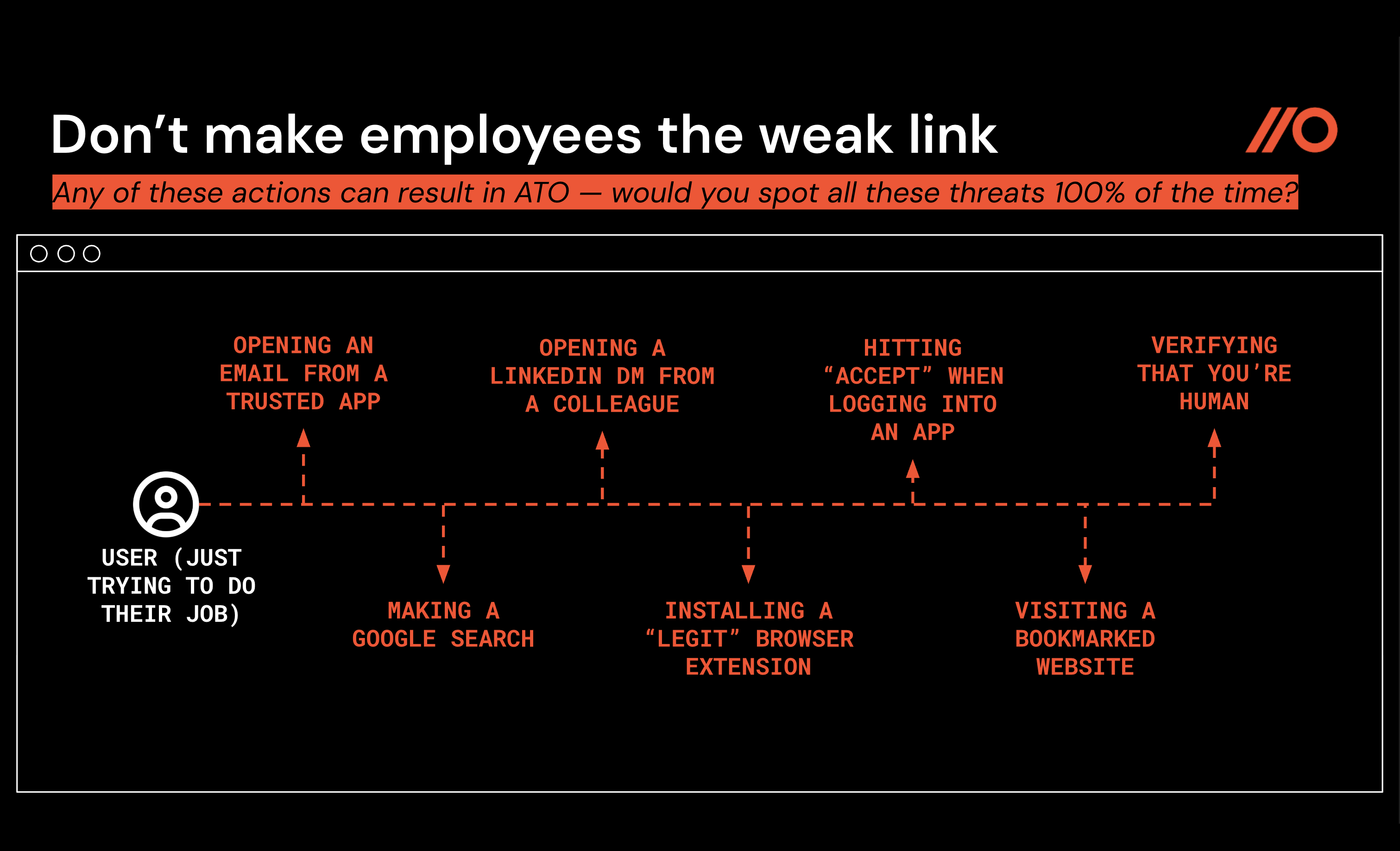
To avoid account or endpoint compromise while going about your daily work as a user, you would need to accomplish these extremely 100% achievable activities, including:
While using search engines, never click on a malicious link in sponsored or organic results (risks: malvertising, SEO poisoning, compromised legitimate webpages, vibecoded phishing webpages).
When opening an email from a trusted app you use every day for work, always recognize when the context is a little suspicious and never open a high-importance calendar invitation or file share link (risks: abuse of trusted services and domains for phishing).
When reading a LinkedIn DM from a colleague, always noticing when the account is being spoofed or has been hacked, and never clicking on an interesting link to explore investment or job opportunities (risks: abuse of social media DMs for phishing).
When logging in to an app, never follow benign-seeming but actually malicious instructions to enter a code onto a legitimate page in order to complete your login (risks: AiTM phishing, OAuth consent phishing, device code phishing).
When verifying that you’re human on a CAPTCHA page, always notice when the CAPTCHA workflow is being abused and never download a malicious script to run infostealer malware on your device (risks: ClickFix, ConsentFix).
When installing popular AI tools using the command line, always notice when a pixel-perfect installer webpage is being spoofed and never accidentally install malware (risks: InstallFix).
Easy, right?
So if you can’t train your way out of these problems, what about locking down and blocking your way out of the problem?
This, too, simply isn’t feasible.
Modern cloud-first adversaries routinely rotate domains on malicious pages; use trusted services like SharePoint, Adobe, Google Sites, Cloudflare, and Atlassian to deliver lures; target end-users across multiple channels, including social media, forums, chat platforms, Google search results, email, and webpages; and use legitimate security tools like bot protection to bypass detection by other legitimate security tools, such as web content scanning and analysis solutions.
Learn more about the browser-based attack techniques driving the biggest breaches of the last year in our 2026 Browser Attack Techniques ebook.
To protect users while they work online, you need a purpose-built security tool that can respond in real time to modern TTPs and guide users securely — without introducing extra work or a lot of friction. Push can help with that.
Why in-browser controls?
Simply put, using in-browser security controls gets you the closest to the user and their work in order to protect them from modern browser-based threats. Adding in-browser controls also solves two tricky problems for security teams:
Filling the gap between solution layers in order to detect and block attack methods like Adversary-in-the-Middle phishing, malicious browser extensions, and ClickFix-style social engineering attacks that other tools miss.
Providing just-in-time security enforcement to end-users when it’s the right moment to act on that guidance, reducing your attack surface across your online apps, browser extensions, and accounts, and ensuring your app usage policies are followed.
Fill the gap between solution layers
Most existing security solutions operate just outside the context of a user interacting with a webpage. This leaves blind spots that attackers are exploiting between layers of security tooling.
For example, network proxies see HTTP requests, URLs, and page headers, but not the structural elements of the DOM or on-page user interactions that are key to fingerprinting the behavior of AiTM phishing kits or ClickFix-style social engineering attacks.
Similarly, EDR tools only see the bad thing when it hits the endpoint, and many cloud security tools rely on complex policy configurations across a core set of apps to provide security protection — leaving a gap in detection and response capabilities outside their purview.
The Push research team has written extensively about how cloud-first operators like Scattered Lapsus$ Hunters use a variety of methods to evade existing security controls, if you’d like to dig into the details.
Provide just-in-time security enforcement
As some of our customers like to say, Push provides security teams with a “seat on the user’s side” of the equation so you can enforce security best practices.
Having that seat on the user’s side also helps you deliver guidance in the right context for it to be followed: When the user is engaged in doing the behavior you want to influence (or prevent). The right information, at the right time, in the right format — not a belated reminder through a different channel that’s easy to ignore.
With those outcomes in mind, let’s look at some specific solutions from the Push platform.
How Push helps you protect users from browser-based ATO, ClickFix, and similar attacks
The Push platform provides out-of-the-box detections for browser-based attacks, including:
AiTM phishing kits that can bypass MFA
Cloned login pages designed to steal user credentials
Malicious copy and paste attacks like ClickFix, FileFix, and similar
For each of these attack vectors, Push delivers detection events and associated metadata for quick triage by the security team, as well as employee-facing warn or block screens, based on your selected configuration.
Here’s a snapshot of the capabilities of these controls and what end-users will experience.
The scenario: When a user encounters a malicious page — whether that’s an AiTM phishing tool running on a webpage, or a ClickFix-style attack — or attempts to install a malicious extension, Push immediately steps in.
Push can prevent users from entering their credentials on phishing pages, including cloned login pages, or from pasting malicious clipboard contents that can run malware on their device. Push can also prevent users from installing known-bad browser extensions.
In each of these scenarios, Push admins get detailed detection information they can use to triage the incident.
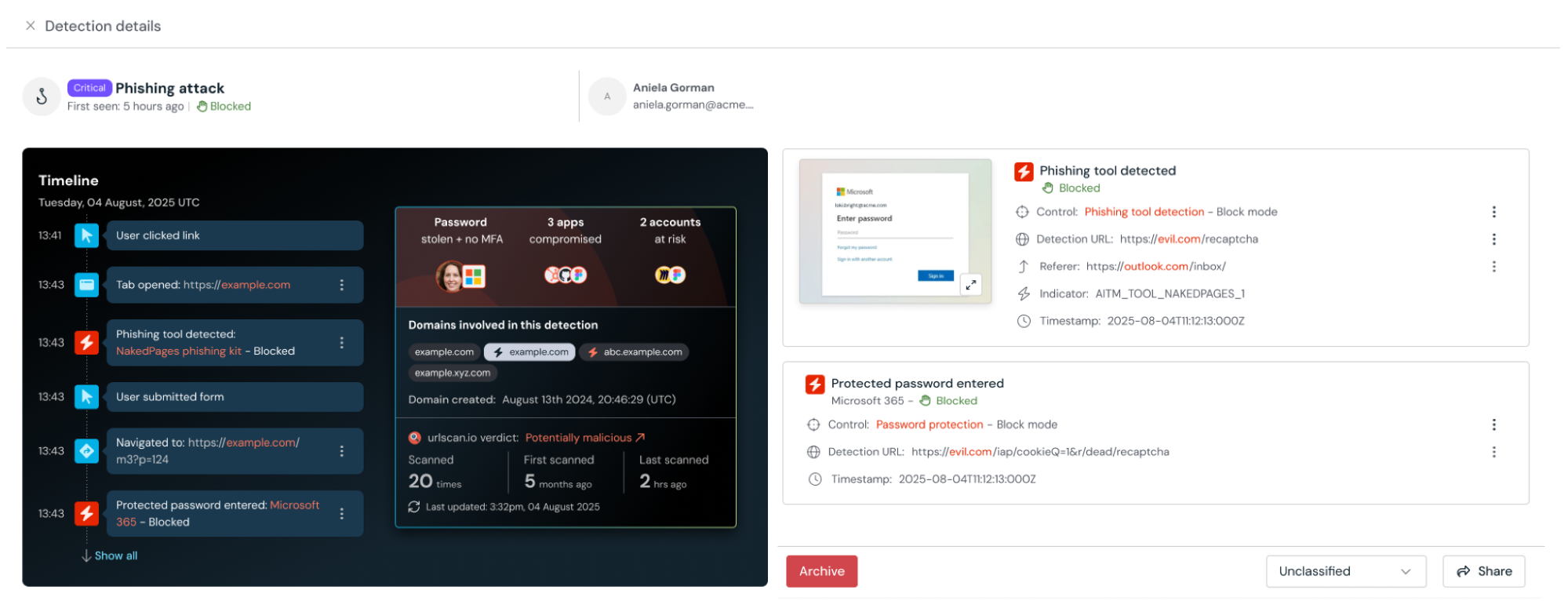
How it works: Rather than relying on known-bad intelligence like domains or URLs, Push performs a behavioral and structural analysis of malicious pages in real time.
That means a phishing page never has to appear in a threat intelligence feed in order to be detected and blocked.
Similarly, for malicious copy and paste attacks like ClickFix, Push analyzes the content copied to the clipboard but also evaluates the context of the page to reduce false positives. In blocking mode, Push’s control for ClickFix-style attacks replaces the malicious clipboard contents with safe text — preventing potential endpoint compromise before it can occur.
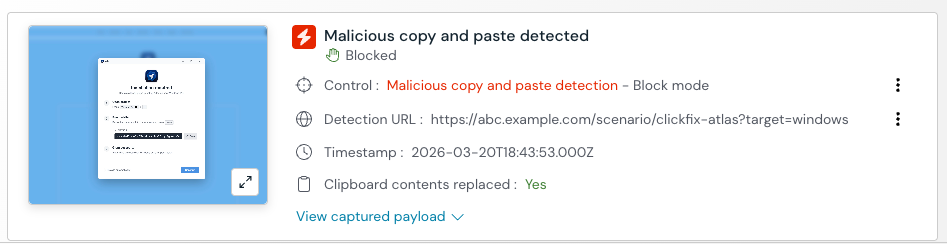
Finally, for identifying malicious browser extensions, Push takes a slightly different approach — combining both behavioral detections and curated intelligence of known-bad extensions from our own research and from trusted industry sources. We’ve found this combination provides the highest-fidelity way to identify malicious extensions without relying on approaches like analyzing extension permissions, which often isn’t actionable.
Your security team gets: Readymade detection and alerting, combined with detailed telemetry. Detections and their associated metadata can be consumed via Push’s REST API and webhooks.
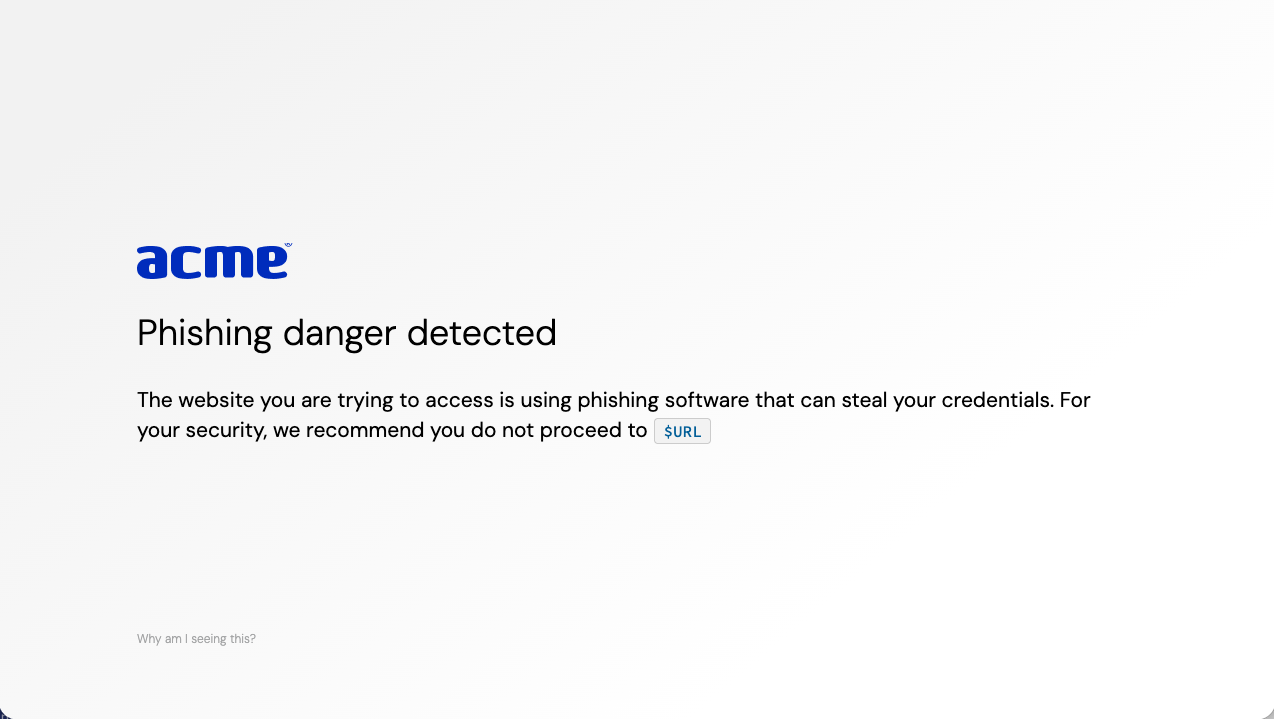
Your end-users see: An immediate block screen in your company colors and brand style, providing a highly memorable, contextual moment of learning — and reassuring them that an incident has been prevented.
How Push helps you remediate account vulnerabilities at scale
Just-in-time security enforcement works best when it’s trustworthy and contextual — without making a lot more work for your team. Push also provides readymade controls for remediating common account vulnerabilities that contribute to your attack surface online, helping you harden existing accounts and reduce behaviors that introduce new risks.
With Push, you can:
Prevent the phishing or reuse of high-value passwords, like your IdP, AWS, or code repository passwords.
Remediate missing MFA or insecure passwords on any work app, even those not managed by your SSO solution.
Use in-browser banners to add guardrails to app usage, including blocking unapproved SaaS or collecting a business reason to access an app before approving it.
Block unwanted or unapproved browser extensions from being installed, or disable them if they’ve been installed previously.
Here’s a snapshot of the capabilities of these controls and what end-users will experience.
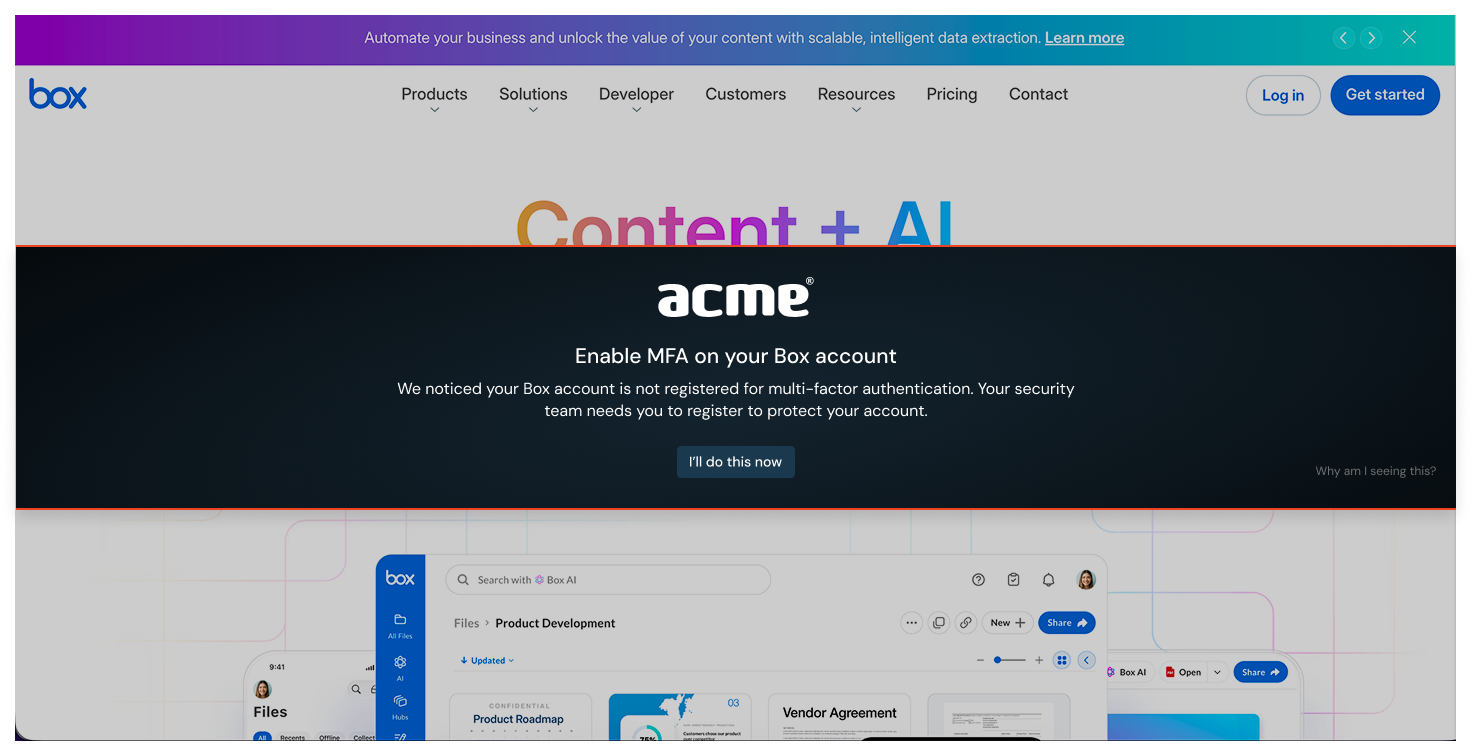
The scenario: Push uses in-browser controls to intervene when a user is missing MFA; reusing a high-value password; using an insecure password; attempting to log in to an unapproved app; or attempting to install a blocked extension.
Push can block users from reusing passwords set as “protected” (meaning they can’t be reused on any other page or app) or from using unapproved apps or extensions. Push can guide users to update their password or register for MFA on accounts where they lack it. Push can also provide any other specific security or policy guidance to employees via banners that appear on apps in your environment, including GenAI apps.
For all of these scenarios, you can tune Push controls to your preferred mode (informing vs. blocking, for example) and select which employees, employee groups, and apps or accounts to focus on.
You can also customize the message that employees see, to match your organizational culture and policies.
How it works: The Push browser agent observes real-time user behavior and securely analyzes users’ account vulnerabilities in order to identify risks and execute your preconfigured controls.
To identify MFA status, Push uses the app’s own API to query the logged-in user’s registered MFA methods. To analyze password security, Push creates a salted, truncated hash that is stored locally in the user’s browser and then used for comparison to find reused passwords, leaked passwords, and shared passwords.
Using the MFA enforcement and Strong password enforcement controls, you can then automatically display a banner to users with those account vulnerabilities, guiding them to fix the issue.
Using Push’s Password protection control, you can select apps where you want to essentially “pin” the high-value password to only that app and prevent its reuse (or phishing) on any other domain.
Using Push’s Browser extension blocking control, you can create a blocklist or allowlist of extensions and prevent users from installing or enabling blocked extensions.
Finally, using Push’s App banners feature, you can add custom messages in a range of modes — from informing to blocking — to apps in use across your business, or even specific URL patterns.
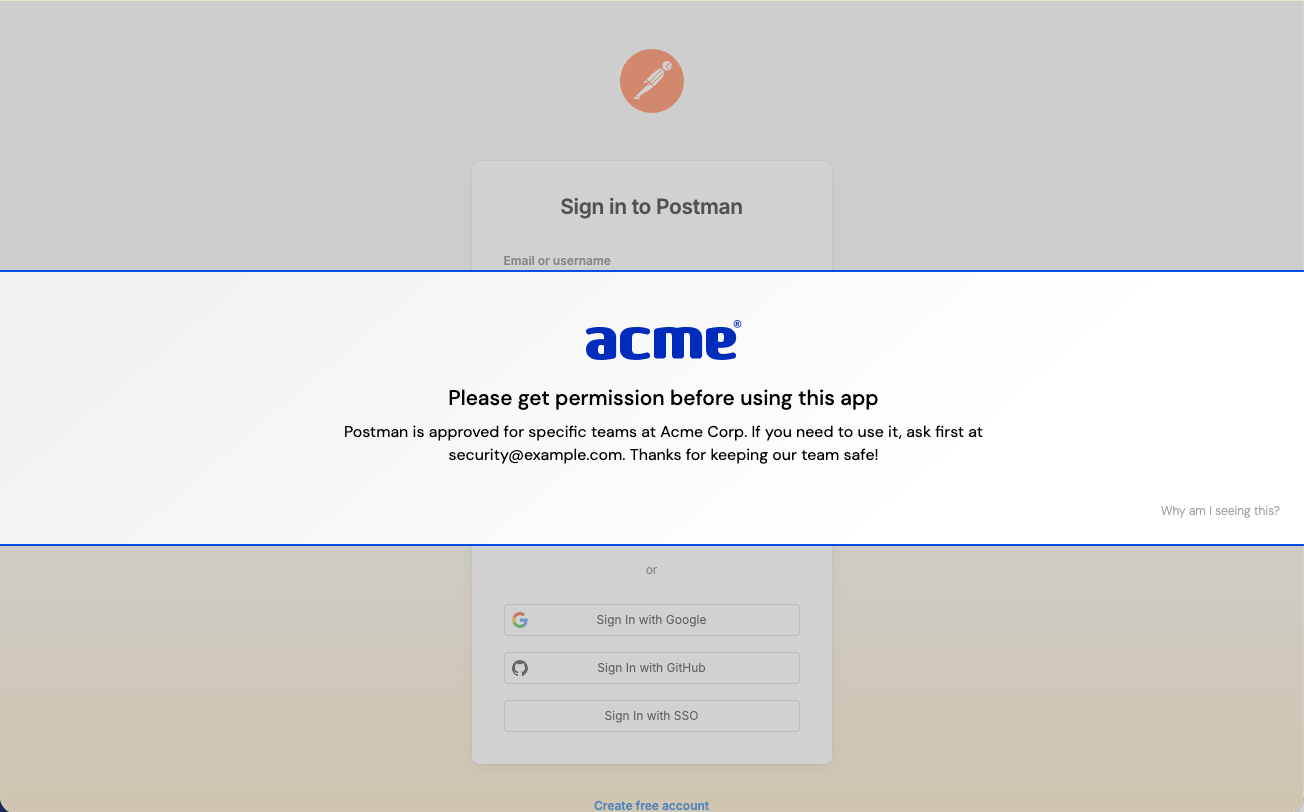
Your security team gets: A flexible and highly configurable set of controls to solve account vulnerabilities at scale and to enforce your security controls around browser extensions and app usage.
Your end-user sees: Contextual, actionable guidance in the midst of their actual workflow, helping them fix the issue or guiding them to safety.
Implementation tips
Push allows you to set the scope and mode of each control, making it simple to roll out.
We recommend starting in Monitor mode for controls that intervene in end-user activities. That way, you can perform testing with sample malicious sites or scenarios like reused protected passwords, tune out any benign true positives, and develop the messaging you want to use on warn or block pages. (For controls without an explicit monitor mode, like Strong password enforcement, you can still monitor for related events on the Events page, such as account security findings, or by consuming webhooks into a downstream tool.)
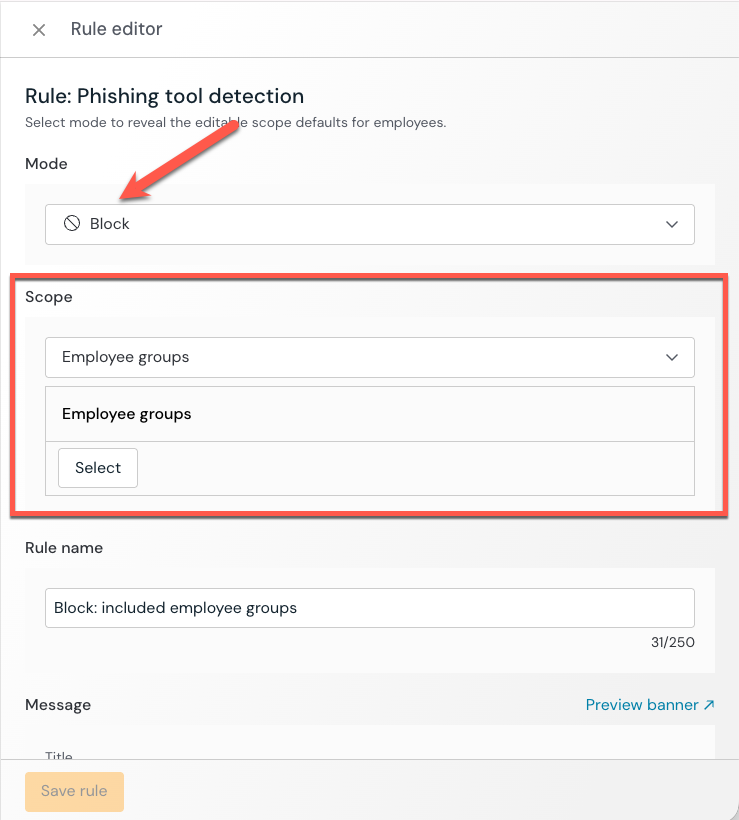
When you’re ready, set the mode to Warn or Block and use the scope options to perform a phased rollout to your user population by adding additional user groups to the control until you have complete coverage of your population.
By consuming webhook events into your SIEM, you can integrate Push alerts into your existing security workflows, monitoring for new detections or tracking when account vulnerabilities are resolved.
Enhancing user trust with custom branding
We recently released the option to customize the look and feel of all employee-facing banners and block pages.
From the Settings page in the Push admin console, you can upload your logo, add accent colors, and choose from light or dark backgrounds.
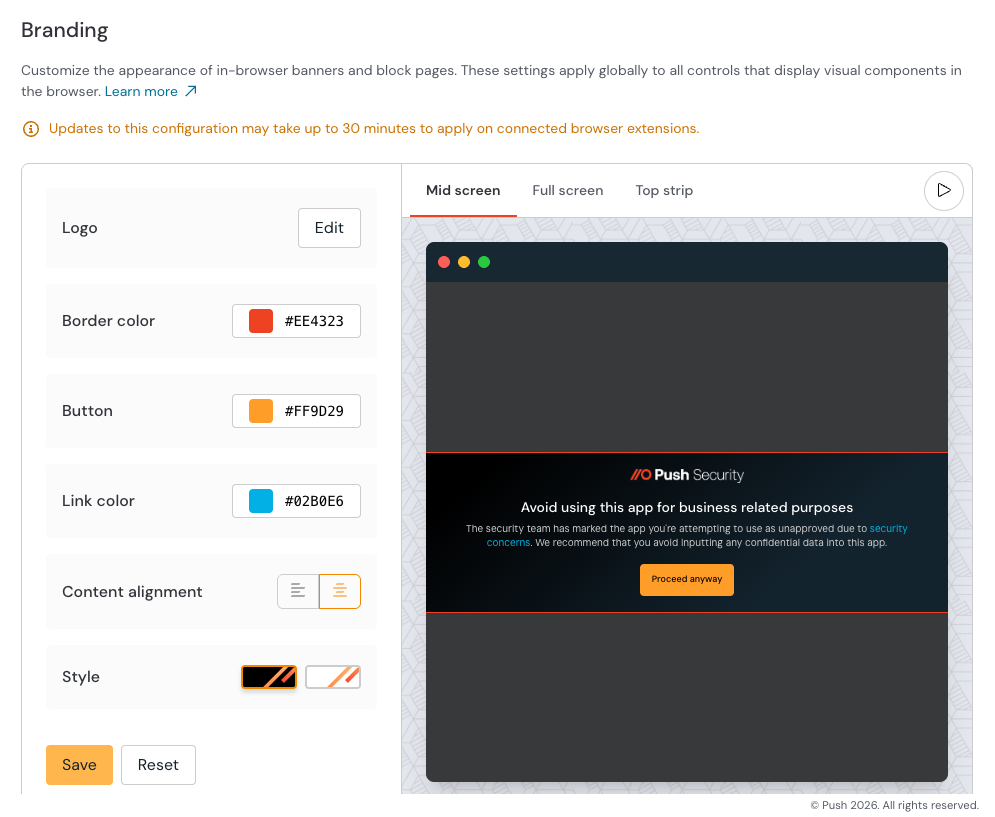
Custom branding increases the trustworthiness of these in-the-moment security guardrails so that users recognize them immediately and act on their guidance.
The result: Better compliance and lower friction for you and your employees.
Learn more about Push
Push Security’s browser-based security platform stops browser-based attacks like AiTM phishing, credential stuffing, malicious browser extensions, ClickFix, and session hijacking — modern attack techniques that are the leading cause of breaches today.
You don’t need to wait until it all goes wrong either. You can also use Push to proactively find and fix vulnerabilities across the apps that your employees use, like ghost logins, SSO coverage gaps, MFA gaps, vulnerable passwords, and more to harden your attack surface.
Want to learn more about Push? Check out our latest product overview, visit our demo library, or book some time with one of our team for a live demo.