

Device code phishing is an account takeover technique that abuses the OAuth 2.0 Device Authorization Grant to steal access tokens while bypassing standard access controls (like passwords, MFA, and even passkeys).
Device code phishing is an account takeover technique that abuses the OAuth 2.0 Device Authorization Grant to steal access tokens while bypassing standard access controls (like passwords, MFA, and even passkeys).
The OAuth 2.0 device authorization grant was designed to enable input-constrained devices to sign-in to apps by asking the user to complete the login on a separate device by entering a code. But today, it’s mainly used when accessing CLI tools, meaning that many users encounter the device code flow daily.
Device code phishing attacks designed to exploit this authorization flow are not new — it was among the first techniques that we added to the SaaS attacks matrix back in 2023. But it’s taken until now for it to really enter mainstream adoption.
The technique tricks a user into issuing access tokens for an attacker-controlled application (not a device, confusingly). Any app that supports device code logins can be a target. Popular examples include Microsoft, Google, Salesforce, GitHub, and AWS. That said, Microsoft is, as always, much more heavily targeted at scale now than any other app.
At the start of March, we’d observed a 15x increase in device code phishing pages detected by our research team this year, with multiple kits and campaigns being tracked — with the kit now identified as EvilTokens the most prominent. That figure has now risen to 37.5x. More on that later.
We’ve always been surprised that attackers haven’t commonly used device code phishing in their standard toolkit, preferring session-stealing AITM phishing and other social engineering attacks like ClickFix. But it’s pretty clear from the recent data that the shift to mainstream adoption has now happened.
In this blog post, we’ll explore the history of device code phishing, what’s changed for it to enter mainstream adoption, how it works under the hood (with recent examples), and what security teams can do about it.
A brief history of device code phishing
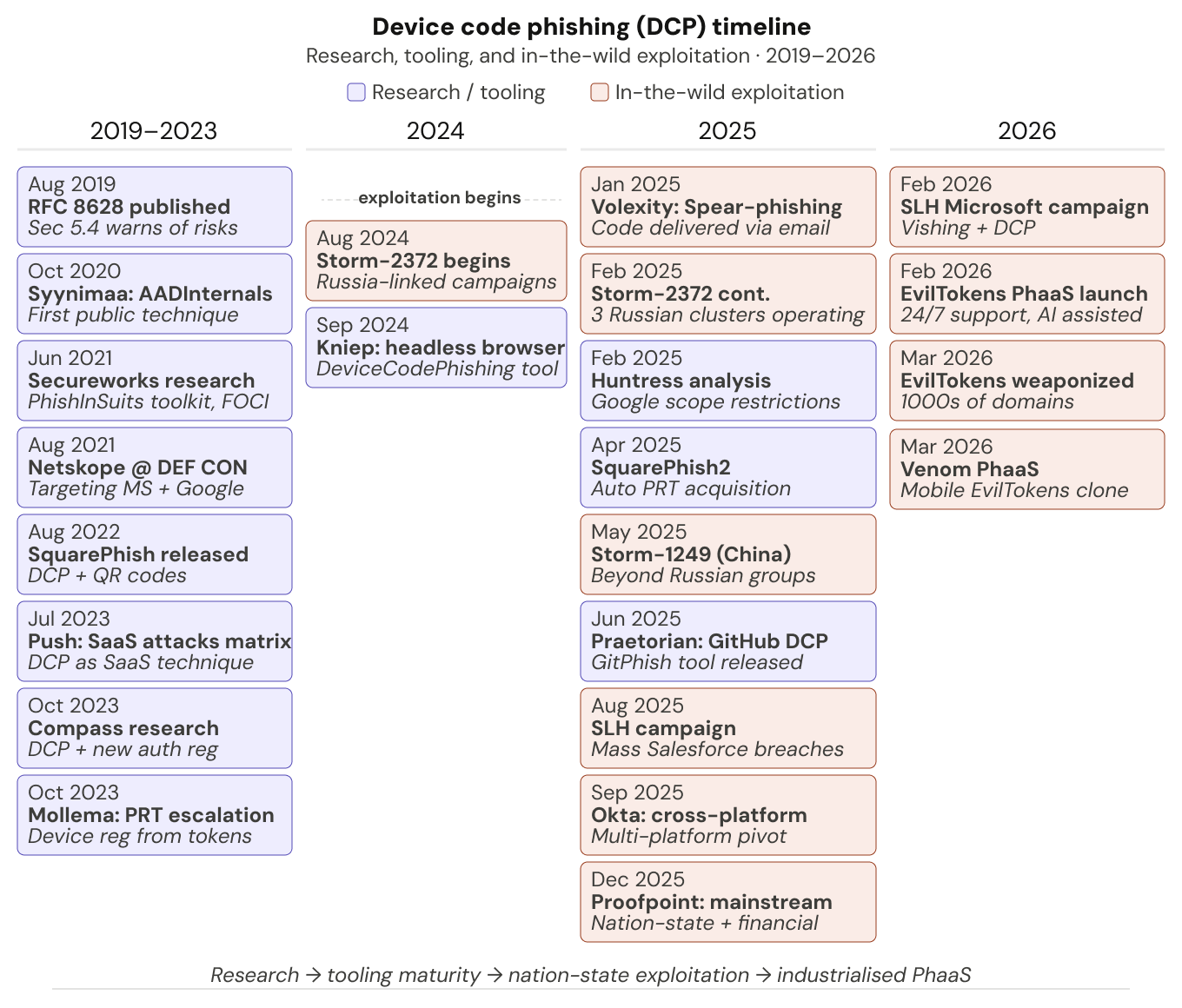
The technique was first documented in 2020, before Secureworks released the first tooling framework PhishInSuits a year later. A host of research followed, including SquarePhish v1 (using QR codes to trigger the 15 minute code expiration window), Dirk-Jan Mollema’s key research (chaining device code phishing via Microsoft apps into Primary Refresh Token (PRT) acquisition to gain full browser-level access) and Dennis Kniep’s DeviceCodePhishing tool which automates the entire flow with a headless browser. (Other recent noteworthy tools include SquarePhish2 and GitPhish, so shout out to those too).
It wasn’t until August 2024 that in-the-wild exploitation was first identified, with Russia-linked campaigns then continuing into 2025 before entering mainstream criminal adoption. This trend has continued to gather momentum in 2026 with EvilTokens, the first reported criminal PhaaS kit for device code phishing, already powering massive campaigns after launching in February.
PhaaS is key to the adoption of new phishing tools and techniques, providing broad access to criminal operators at scale while driving up execution standards. It has been central to the continued evolution of AITM and ClickFix, and is a strong indicator of what comes next for device code phishing.
Some of the noteworthy in-the-wild campaigns include:
Storm-2372, tracked by Microsoft and Volexity, linked to multiple Russia-aligned clusters, combining spear-phishing and social engineering with device code phishing payloads against strategic intelligence targets.
The massive Salesforce campaign operated by Scattered Lapsus$ Hunters (SLH) combined vishing with a device code phishing payload targeting Salesforce. The attacks morphed into a broader supply chain campaign using stolen credentials, ultimately resulting in 1000+ organizations being compromised and over 1.5 billion stolen records claimed.
A massive spike in activity in late 2025 and 2026. This includes multiple threat clusters tracked using device code phishing techniques, more criminal operations linked to SLH, and hundreds of organizations being targeted via PhaaS architecture, which looks to be the same campaign as the recently uncovered EvilTokens PhaaS reported by Huntress (featuring abuse of the Railway PaaS platform). Abnormal has also reported on a closed-source PhaaS kit called Venom that offers device code phishing capabilities that appear visually and functionally similar to EvilTokens.
What we’re seeing in the wild
As mentioned, we’ve also seen a huge spike in device code phishing activity this year, with multiple kits, page designs, and lure types. We’ve identified 10 distinct kits in circulation in the wild, with EvilTokens being the most prevalent. It’s clear that attackers are both spinning up their own kits and creative derivatives of others — we’ve seen kits that are visually similar to EvilTokens (close enough to be clones or forks) but with very different backends, for example AWS, Digital Ocean, 2cloud, and more.
Since EvilTokens is the only one with public attribution, the names provided are internal codenames. The information per kit is by no means exhaustive and is likely to evolve over time.
“ANTIBOT” (EvilTokens)
Huntress, Sekoia, and researcher Paul Newton have already done a great job of providing IOCs for the recent EvilTokens activity spike, including multiple backend Railway IPs in authentication events.
Our codename for EvilTokens internally was derived from the overly descriptive page code describing its bot protection capabilities (a clear sign of vibe coding — thanks Claude!):
<!-- FIXED ANTI-BOT SYSTEM - WON'T REDIRECT REAL USERS -->
<!-- ENHANCED ANTI-BOT SYSTEM WITH SERVER-SIDE VALIDATION -->
Beyond the most widely observed implementation featuring a Cloudflare Workers frontend and Railway backend for authentication, we’ve also tracked additional versions of EvilTokens in circulation since January 2026 (many of which remain live along with the current “production” version of the kit).
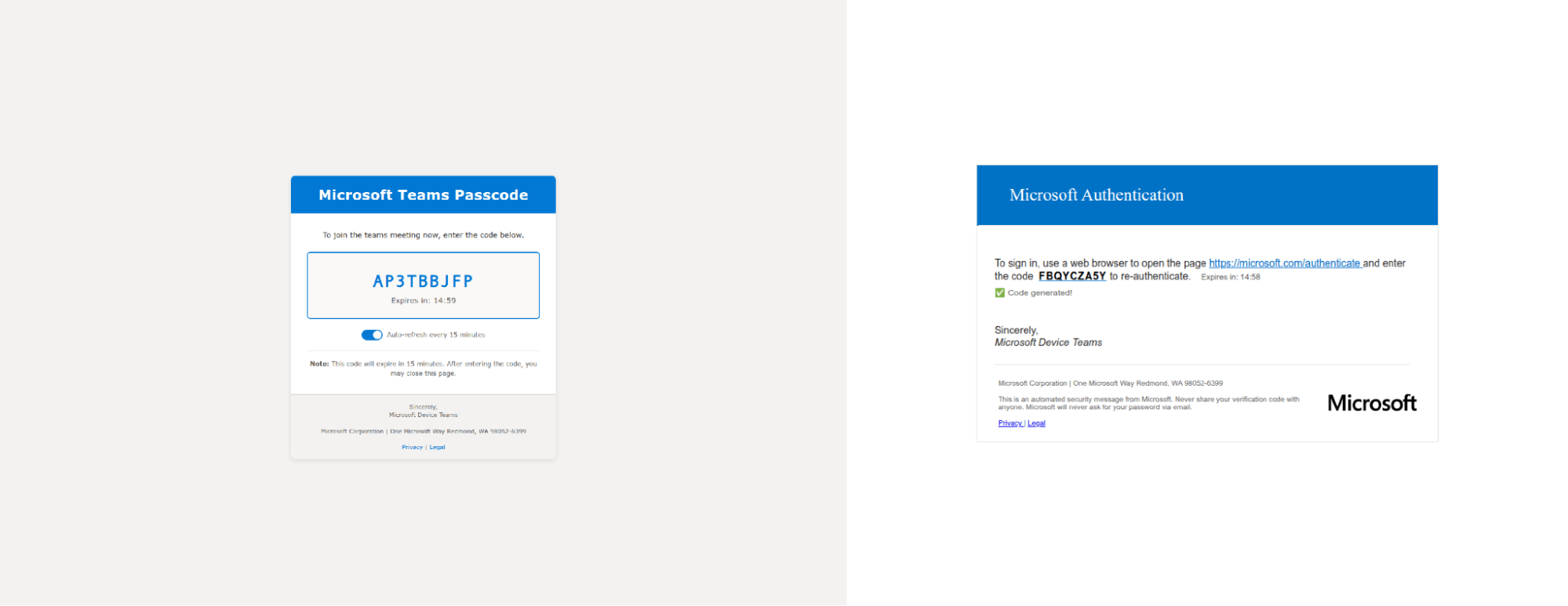
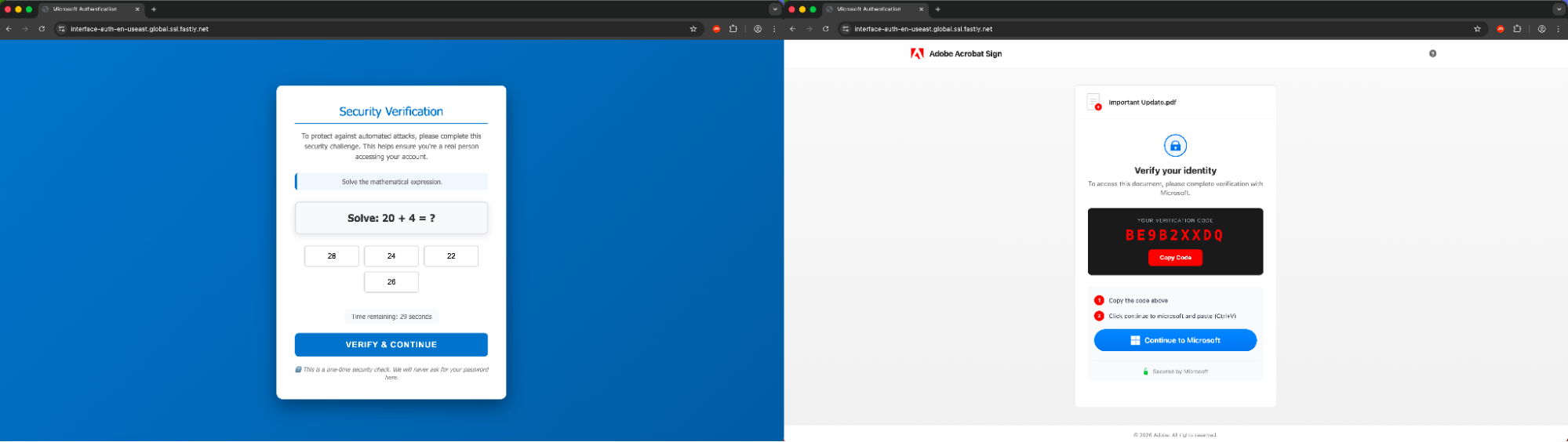
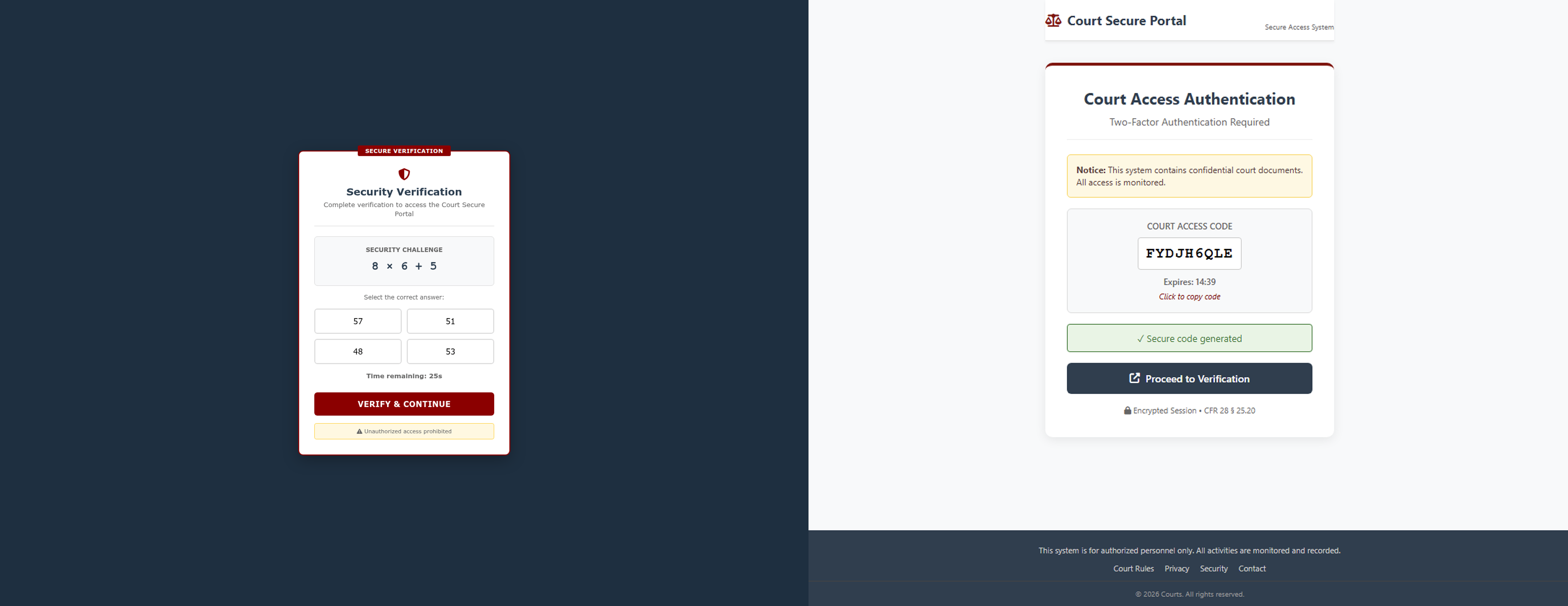
You can see an evolution of the kit in the videos and screenshots below, from early precursors seen in mid-January, the first mentions of ANTIBOT in the page code in late-January, the parallel development of a “Courts Access” fork that lacks the ANTIBOT references, and finally production EvilTokens in February. One of the key threads between the versions is the presence of a generateFallbackCode() JS function and use of a /generate-codes API call.
Early implementations were quite different, for example using ScrapingBee to generate the displayed code, and varied hosting on vercel, fastly, edgeone, and others.
After initially appearing on custom domains, the production version is now predominantly hosted on Cloudflare Workers, as per the broader tracking of the campaign. The descriptive HTML comments around ANTIBOT functions have also been removed in later versions.
The production version of EvilTokens showcases common detection evasion techniques we've come to associate with PhaaS kits in the AiTM space — using multiple redirects through trusted sites before serving the malicious page, using bot protection to block security tools from analysing the page, and so on. It also uses a pop-up window for the device code entry rather than a redirect, reducing the friction for the victim (it looks pretty convincing, too).
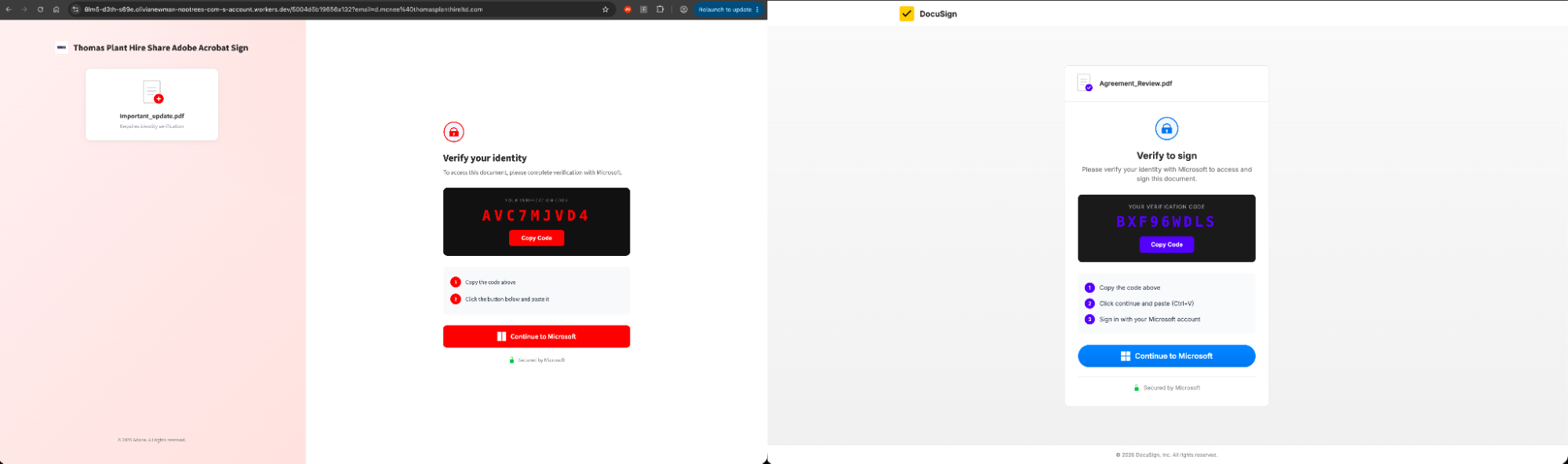
Frontend infrastructure | Workers.dev, vercel.app, github.io, fastly.net, edgeone.dev |
Backend infrastructure | Example IP: (V3) 162.220.232.71 (Railway AS400940) (V2) 71.11.42.193 (V1) 72.218.25.107 Backend User Agent: (V3) node, (V2), Mozilla/5.0 (Macintosh; Intel Mac OS X 10_10_4) AppleWebKit/537.36 (KHTML, like Gecko) Chrome/73.0.3683 Safari/537.36 OPR/57.0.3098.91 (V1) Mozilla/5.0 (Macintosh; Intel Mac OS X 10_11_5) AppleWebKit/537.36 (KHTML, like Gecko) Chrome/71.0.3578.98 Safari/537.36 OPR/56.0.3051.52 |
Network paths | /api/rate-limit /api/fingerprint /api/captcha-verify /api/init /api/generate-code /api/check-auth |
Lure themes | Various MS lures (e.g. Outlook, SharePoint, Teams) DocuSign, Adobe |
Example Domain | Precursor A: teams-zpfvwnpxuc[.]edgeone.dev Precursor B: authenticate-m365-accountsecurity-m-pi[.]vercel.app Courts Access: secure-systems-validations-courts[.]vercel.app Early ANTIBOT: interface-auth-en-useast[.]global.ssl.fastly.net Production ANTIBOT: index-z059-document-pending-reviewsign-xlss7994824[.]awalizer[.]workers.dev |
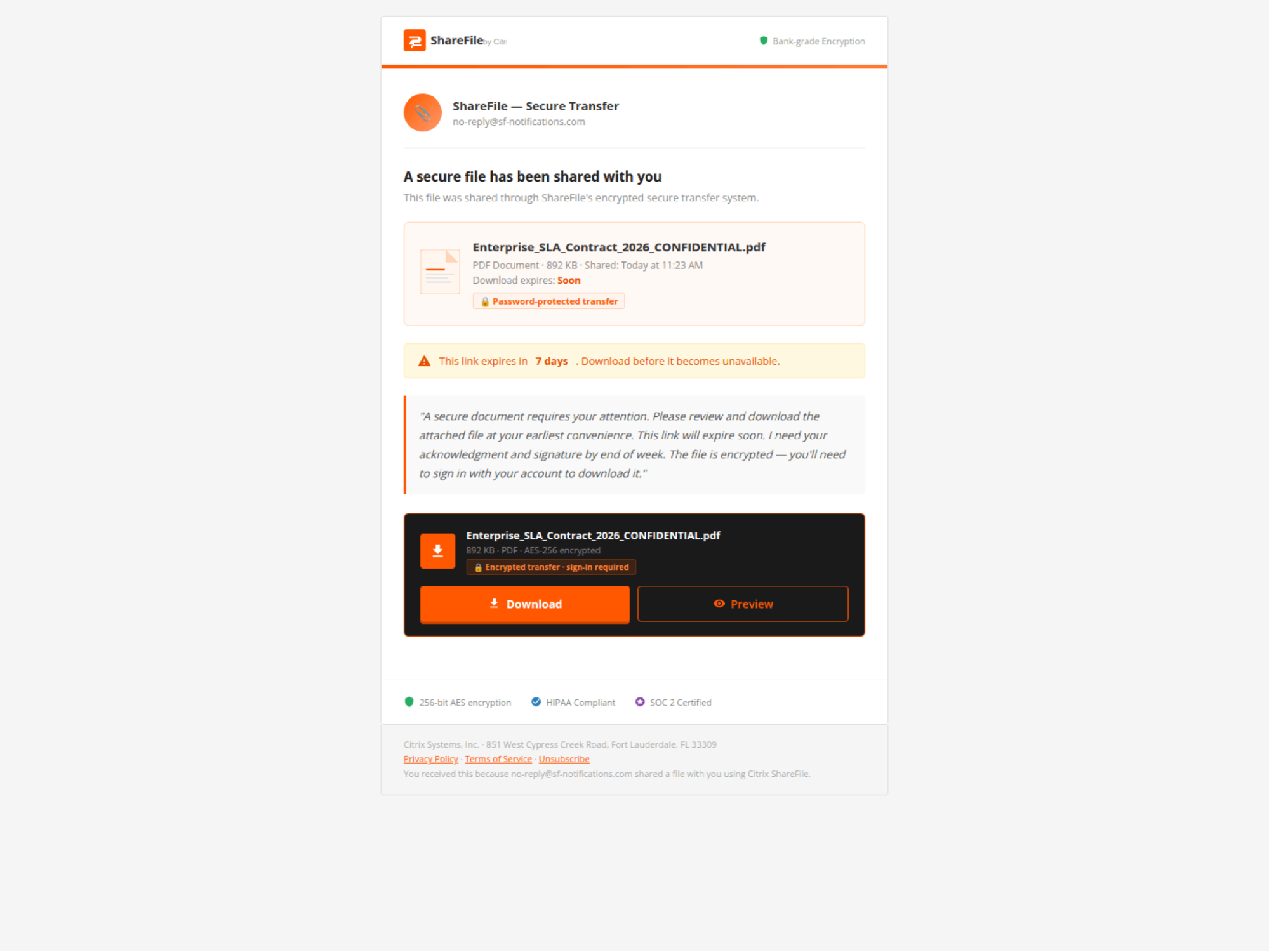
“SHAREFILE”
Frontend infrastructure | No hosting markers visible. |
Backend infrastructure | Example IP: 147.45.60.47 (Global Connectivity Solutions LLP AS215540) Backend User Agent: node |
Network paths | POST /api/device/start POST /api/device/poll |
Lure themes | Citrix ShareFile document transfer — file card with sender info, expiry warning, download/preview buttons |
Example domain | cghdfg[.]vbchkioi[.]su |
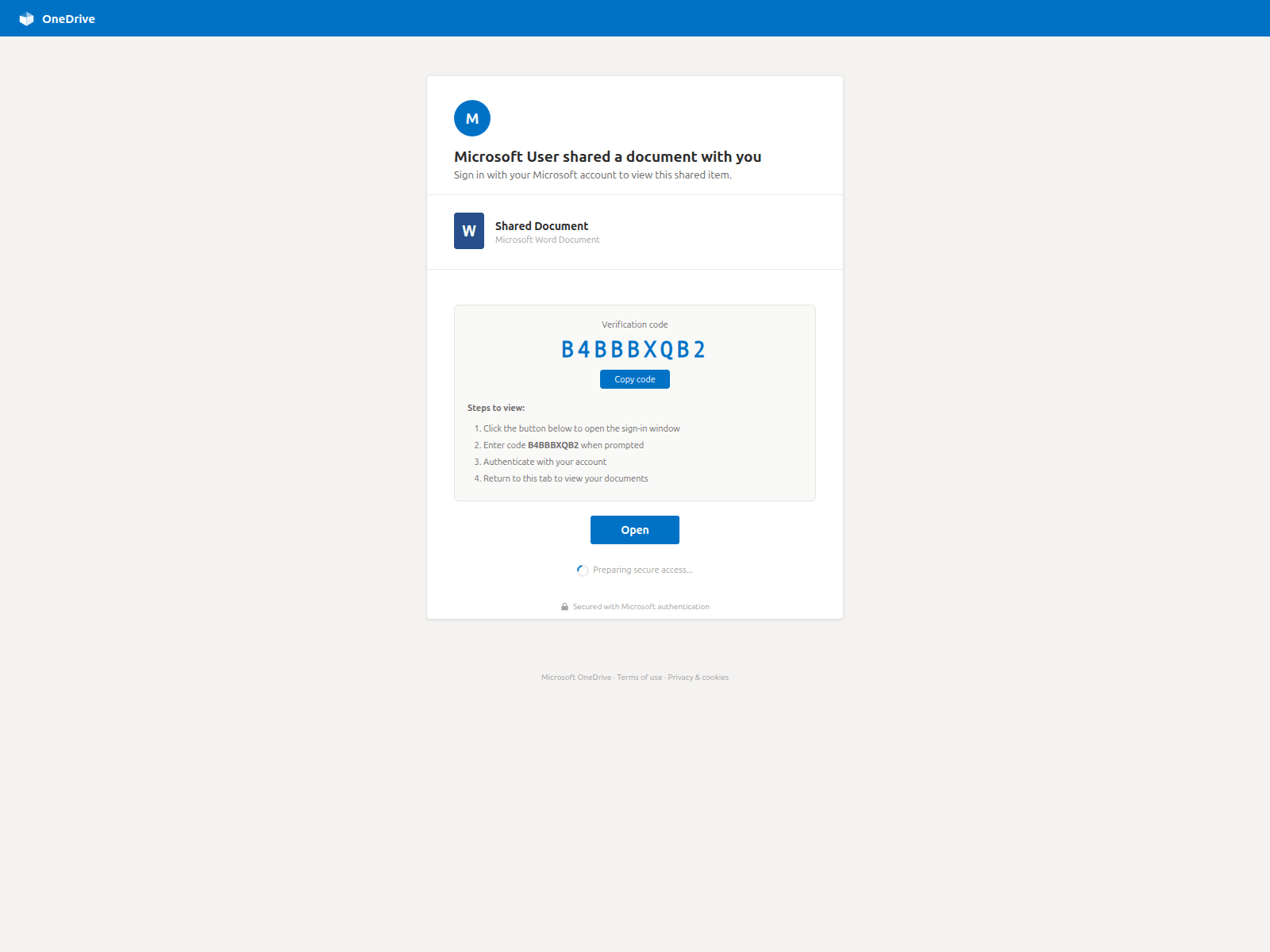
“CLURE”
Frontend infrastructure | API on api.duemineral.uk:8443 and api.loadingdocuments.uk:8443 (rotates). |
Backend infrastructure | Example IP: 162.243.166.119 (DigitalOcean AS14061) Backend User Agent: python-requests/2.32.5 |
Network paths | GET /api/status/{numeric_SID} (port :8443) |
Lure themes | SharePoint "Team Site" doc library, SharePoint "Shared Document" individual share |
Example domain | auth[.]duemineral[.]uk |
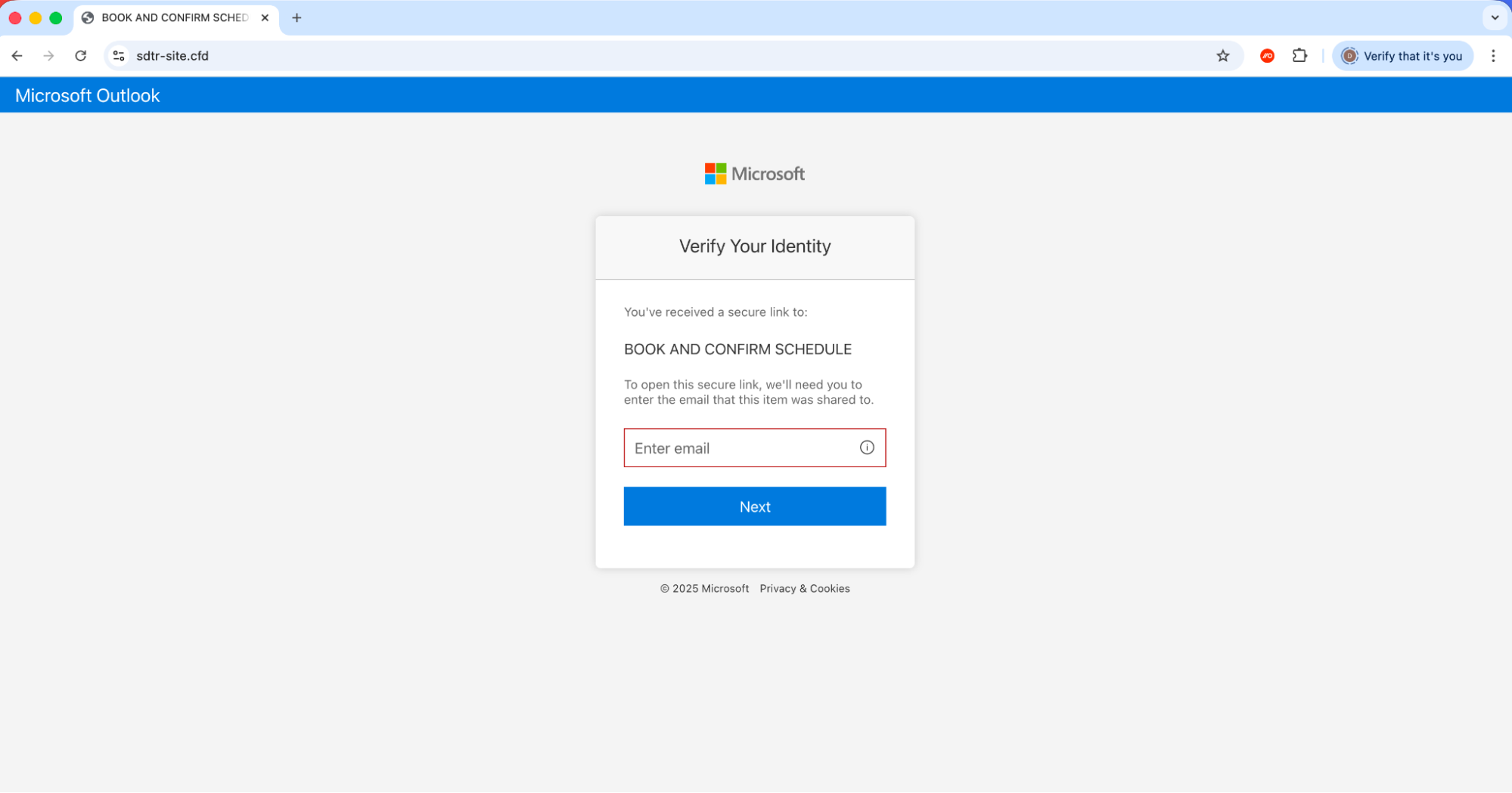
“LINKID”
Frontend infrastructure | Adobe variant has Cloudflare challenge-platform iframe (CF-protected origin). Relative API paths — self-hosted. |
Backend infrastructure | Example IP: 185.176.220.22 (2cloud.eu AS39845) 2600:1f10:470d:9a00:1437:ec30:be61:3494 (AWS AS16509) Backend User Agent: axios/1.10.0 , axios/1.13.6 |
Network paths | POST /api/device/start GET /api/device/status/{sessionId} |
Lure themes | MS Teams meeting invitation (with interactive date/time picker), Adobe Acrobat Sign document review |
Example domain | sdtr-site[.]cfd |
“AUTHOV”
Frontend infrastructure | workers.dev |
Backend infrastructure | Example IP: 192.3.225.100 (HostPapa / ColoCrossing AS36352) Backend User Agent: python-httpx/0.28.1 |
Network paths | GET /landing/api/session-status?session_id=&token= |
Lure themes | Adobe Acrobat document sharing (PDF preview, sender avatar) |
Example domain | milosh-solibella-0dcio[.]sgttommy.workers.dev |
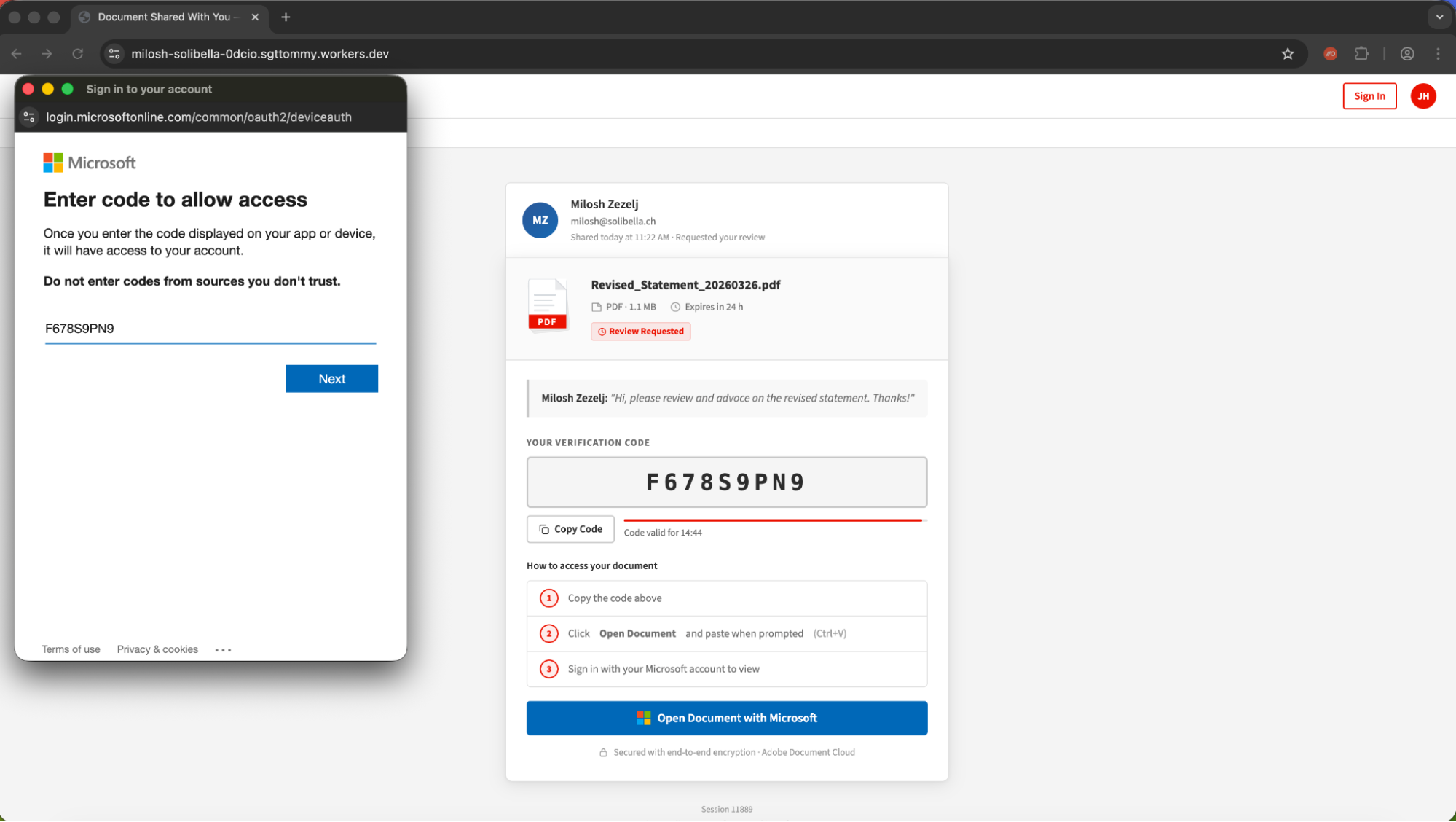
“DOCUPOLL”
Frontend infrastructure | Github.io and workers.dev hosting |
Backend infrastructure | Example IP: 144.172.103.240 (FranTech Solutions / RouterHosting / Cloudzy AS14956) Backend User Agent: Mozilla/5.0 (Windows NT 10.0; Win64; x64) AppleWebKit/537.36 (KHTML, like Gecko) Chrome/70.0.3538.102 Safari/537.36 Edge/18.19042 |
Network paths | POST /api/v1/landing-pages/public/{slug}/init POST .../poll POST .../track |
Lure themes | DocuSign document signing. One sample is a full scrape of real docusign.com (free-account page) with kit injected. |
Example domain | docufirmar[.]github.io |
“FLOW_TOKEN”
Frontend infrastructure | workers.dev |
Backend infrastructure | Example IP: 43.166.163.163 (Tencent Cloud AS132203) Backend User Agent: (null) |
Network paths | POST /api/handler.php (actions: device_code_generate, device_code_poll_public) |
Lure themes | DocuSign "Salary Adjustment Document — 2026", Microsoft banner · HR Department sender |
Example domain | salaryadjustment-2afb52.pmb6fefc52b3f9aa5c2dbf[.]workers.dev |
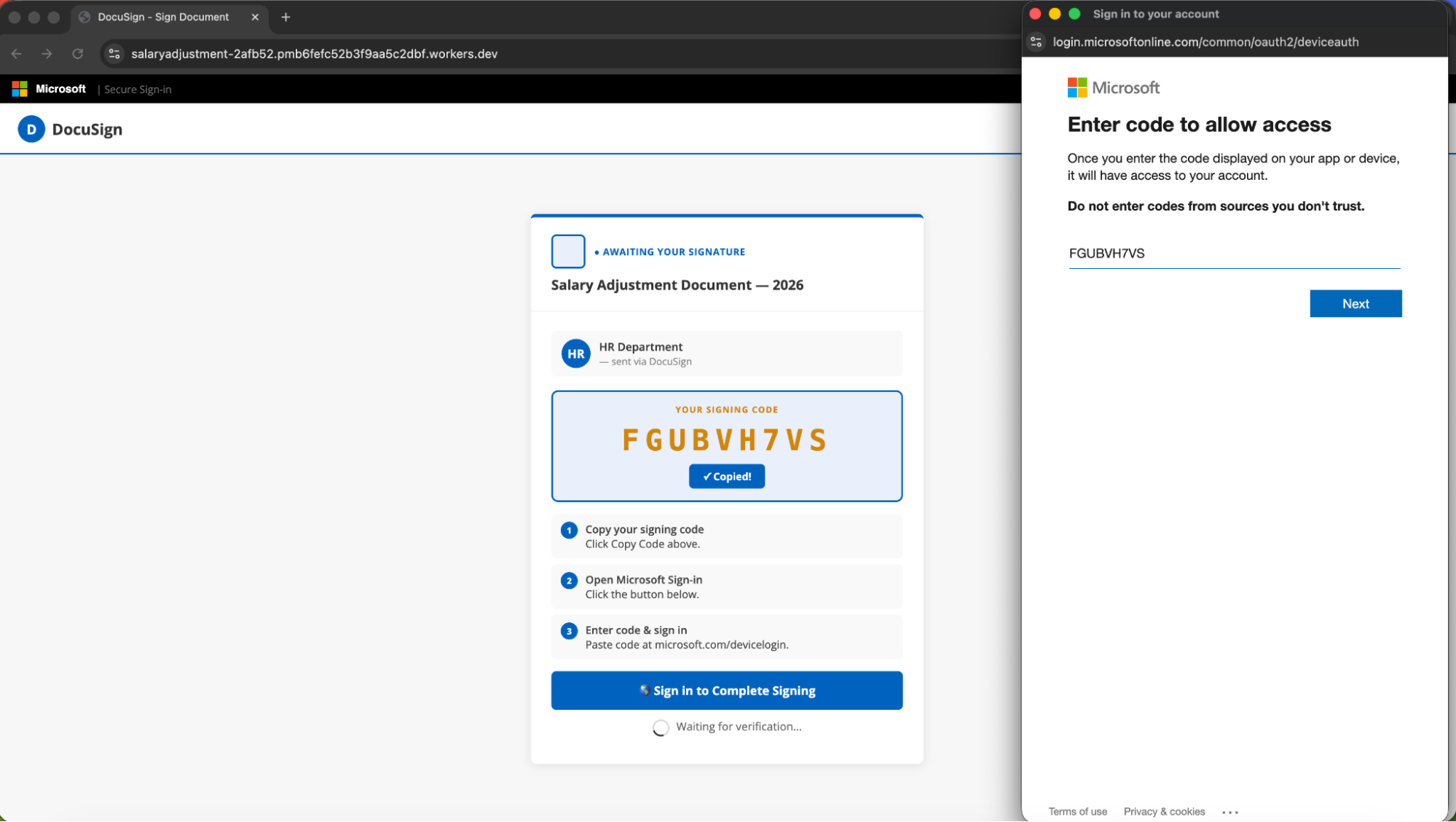
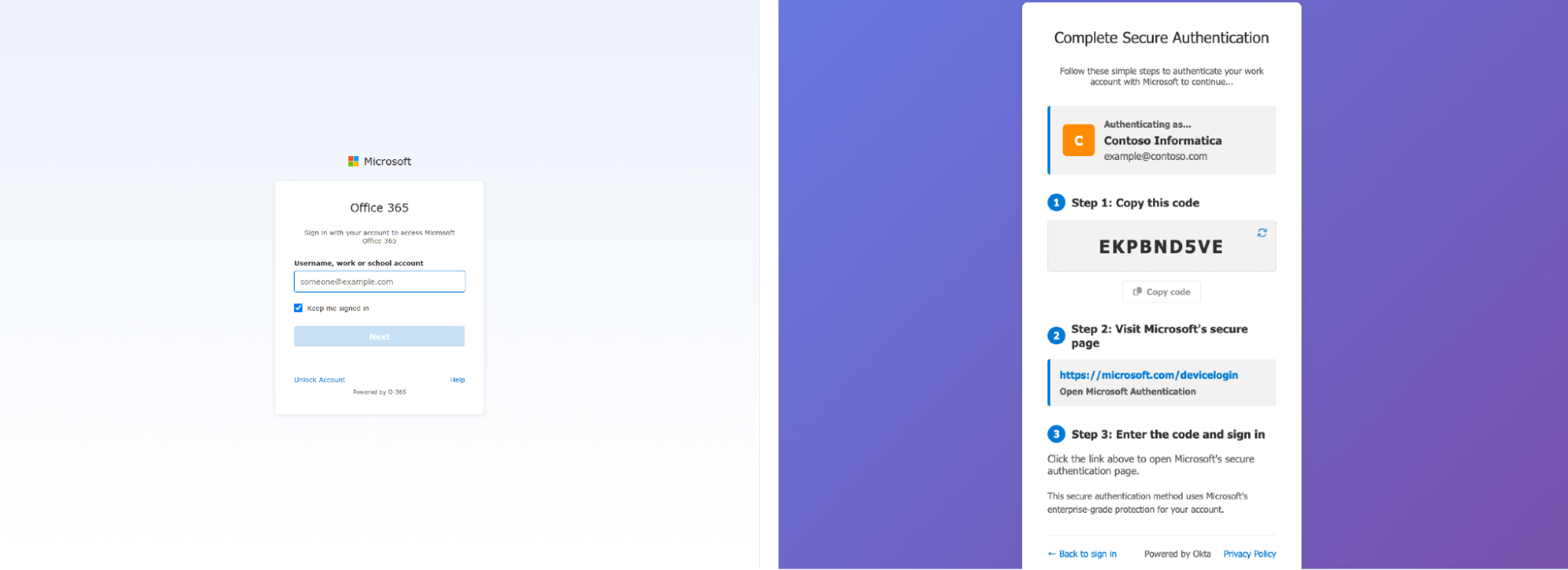
“PAPRIKA”
Frontend infrastructure | AWS S3 hosting |
Network paths | POST /api/v1/loader |
Lure themes | MS login clone ("Sign in to your account"), "Office 365" branding, fake "Powered by Okta" footer |
Example domain | redirect-523346-d95027ec[.]s3.amazonaws.com |
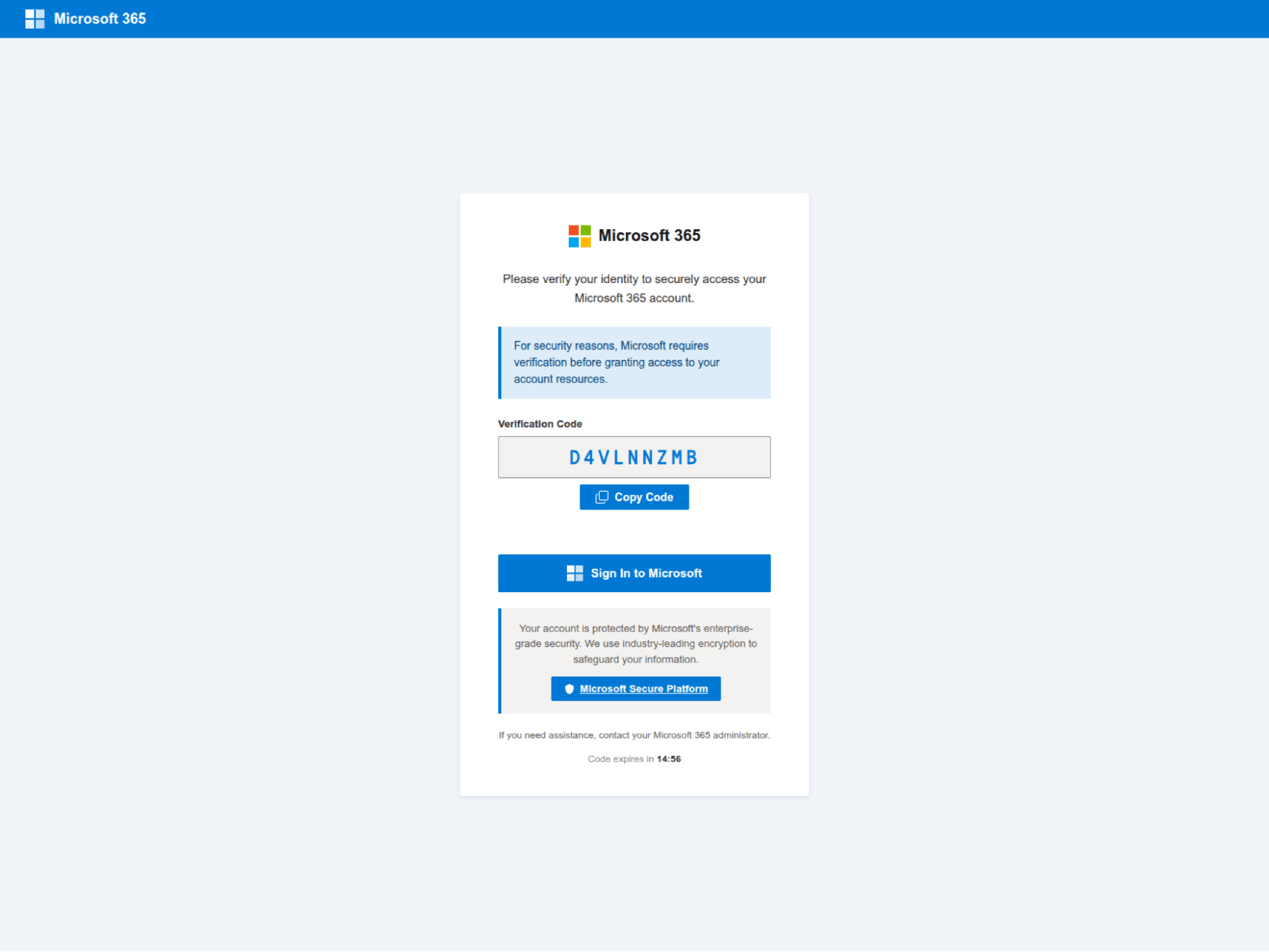
“DCSTATUS”
Frontend infrastructure | No hosting markers visible. |
Network paths | GET /dc/status/{base64url_sid} |
Lure themes | Generic "Microsoft 365 - Secure Access" verification page |
Example domain | owa[.]apmmacleans[.]ca |
“DOLCE”
Our suspicion is that this was a one-off — potentially for a red team exercise — rather than representative of a more widely used kit.
Frontend infrastructure | Microsoft PowerApps hosting |
Backend infrastructure | Example IP: 34.53.159.84 (Google Cloud AS396982) Backend User Agent: Mozilla/5.0 (Windows NT 10.0; Win64; x64) AppleWebKit/537.36 (KHTML, like Gecko) Chrome/123.0.0.0 Safari/537.36 |
Network paths | GET /api/generatecode (CloudFront) |
Lure themes | Dolce & Gabbana branded, Italian language, MS account verification |
Example domain | data-migration-dolcegabbana[.]powerappsportals.com |
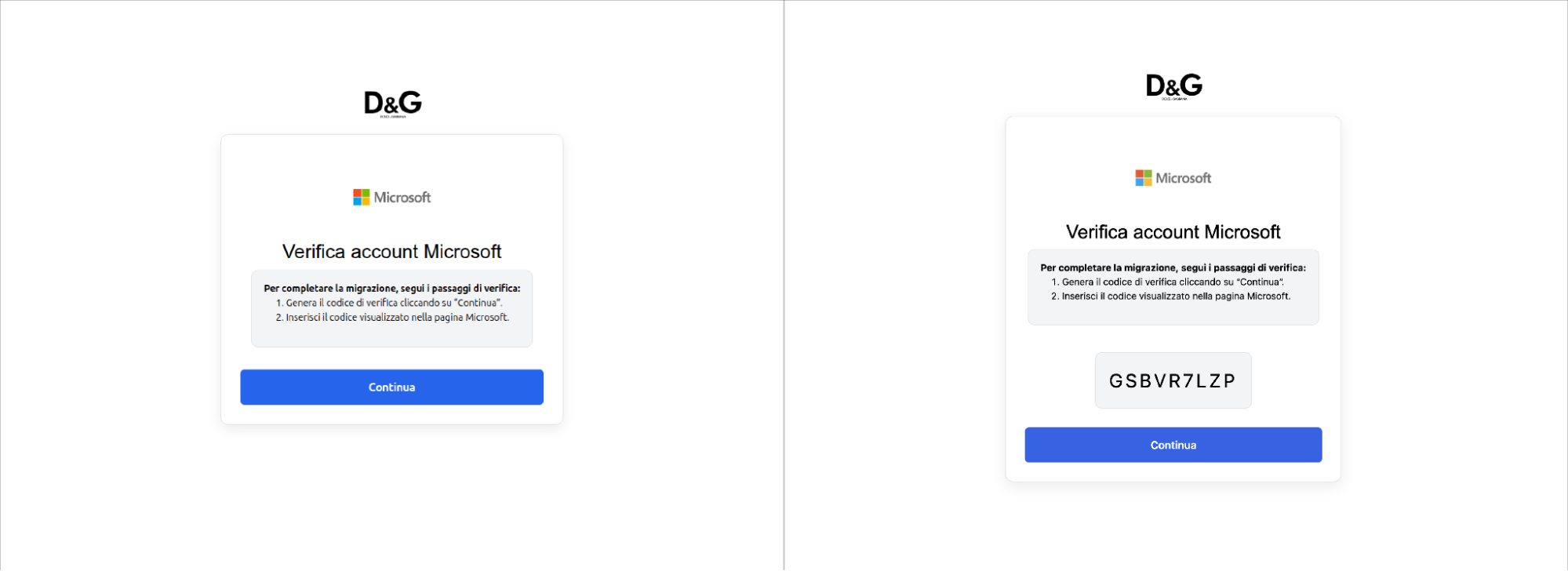
Clearly, device code phishing has entered mainstream adoption and we should be prepared for a lot more of it in future. So how does it work, and why is it so effective?
Device code phishing under the hood
The attacker POSTs to the authorization server's device authorization endpoint with its client_id (i.e. an application ID) and requested scopes or resources. The server responds with a device_code (used for polling), a user_code, a verification_uri, an expires_in value, and a polling interval. The user visits the URL, enters the code and approves the request. Meanwhile, the device polls the token endpoint. Once approved, the server returns an access token, a refresh token (if offline_access was requested), and an ID token (if openid was included). The attacker now has API access to the victim's account.
Broadly, this gives the attacker a comparable level of control to a “normal” phishing attack (with conditions based on the scopes granted and specific app being targeted) while API access grants additional capabilities beyond standard browser sessions. When combined with other techniques, this access can be exchanged to open normal browser app sessions and access SSO connected apps (e.g. the PRT escalation technique for Microsoft that I mentioned in earlier research).
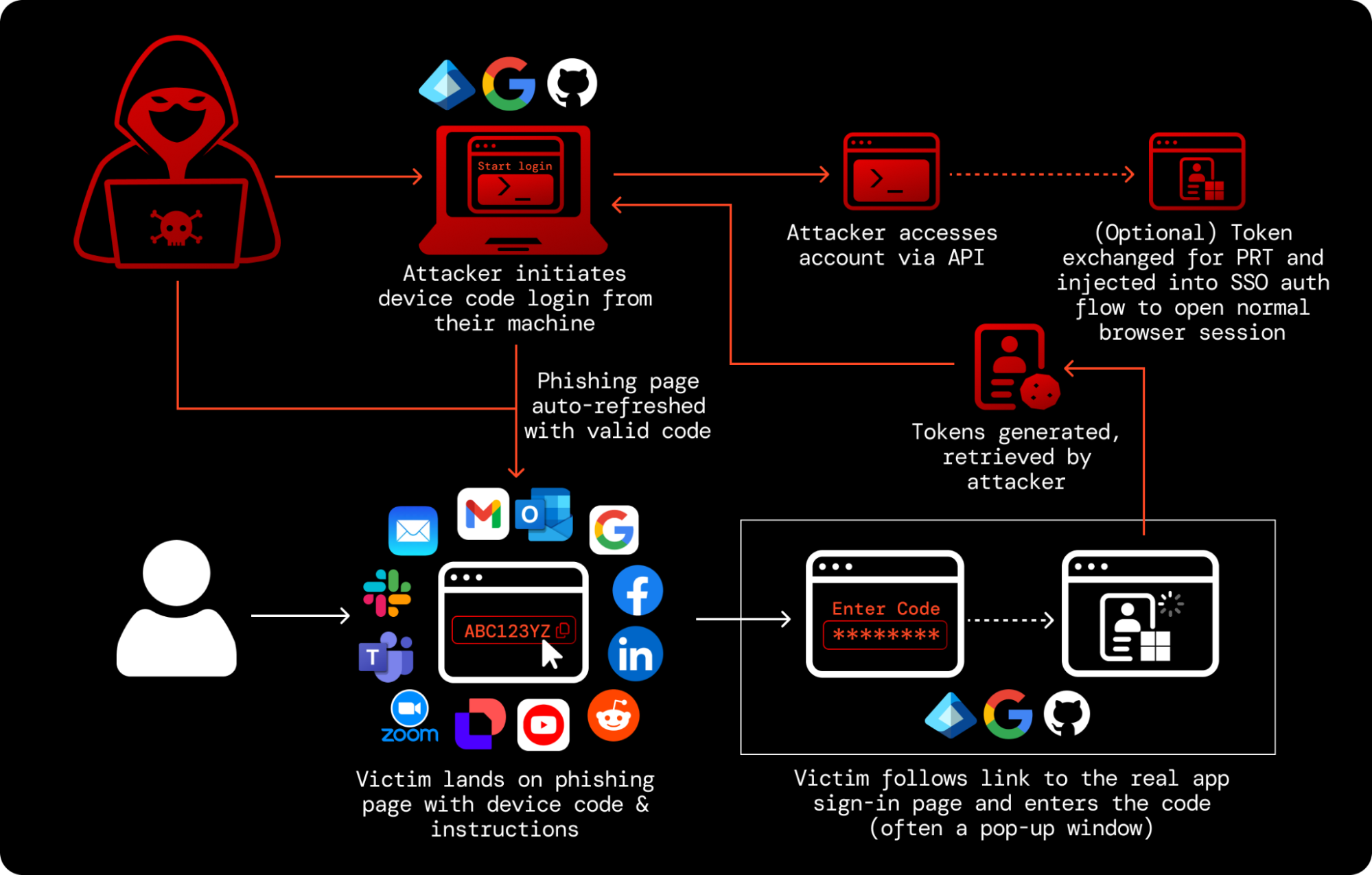
At this point, you can achieve a number of objectives both inside the app ecosystem and across SSO connected apps — e.g. data theft, disruption, and ultimately extortion.
Critically, the initial request to generate a device code is typically unauthenticated across all providers — anyone can generate one, from any machine, without proving any relationship to the target organization.
So, the attacker has to deliver a set of instructions via a phishing channel (e.g. email, social media DM, corp IM platform, and so on) with a device code that they have generated. The victim then enters this code on the legitimate device code login page for that app and issues the tokens to the attacker.
One of the key limitations of early device code phishing was that the code was being sent directly over email (as in the Russia-linked campaigns in 2024-5). This meant that the code would expire unless used immediately, requiring highly engaged social engineering to pull off. To get around this, modern device code phishing pages are continuously polling for fresh codes via API. This arguably makes them more discoverable than simply providing the code and instructions in a direct message, but is way more scalable for the attacker.
First-party vs. third-party apps
First-party applications are commonly abused in Microsoft-targeted attacks. These are real Microsoft applications registered in every Entra ID tenant. Not only are they allowed by default (unlike third-party apps that are often subject to additional restrictions and require additional tenant-level consent before they can be accessed by a user), they come with pre-consented permissions, and can even access undocumented “legacy” scopes.
Many Microsoft first-party apps also belong to the Family of Client IDs (FOCI), meaning a refresh token obtained for one family member can be exchanged for access tokens to other family members without re-authentication. This means that an attacker can silently pivot to other apps and APIs from a single phished session.
These legacy scopes were abused in the Russia-linked ConsentFix campaign (a hybrid of ClickFix-style social engineering with OAuth abuse) reported by Push researchers. This created additional detection challenges as logging of activity against these scopes is not enabled by default.
In other cases third-party applications are leveraged. This doesn’t mean these are fresh, attacker created apps however (though it’s easier than ever for attackers to spin up their own OAuth apps using AI tools). They can simply be attacker-controlled instances of otherwise legitimate apps.
Why device code phishing is so dangerous
Device code phishing bypasses authentication controls (including passkeys)
A device code phishing attack cannot be prevented with authentication controls. This includes all forms of MFA and even “phishing-resistant” authentication methods such as passkeys.
The device code authorization is effectively performed post-authentication. If you already have an active session in your browser, entering the device code and selecting your account from a drop-down menu is all that's needed. No password or MFA required. You can see an example in the video below.
Even if you do have to sign in again (because you're not already signed in for some reason), the attack still works because it isn't targeting the login — it's targeting the authorization layer instead.
This is what makes device code phishing different to other standard phishing methods like AiTM phishing (and arguably even more effective in environments with strict identity control enforcement).
Device code logins are a feature, not a vulnerability, making attacks difficult to block
Device code authorization is a legitimate mechanism that is regularly used in an enterprise environment, particularly for CLI logins. This is a problem for security teams because the phishing attack effectively happens on the legitimate site. The code is delivered to the victim via message or webpage, but the attack itself only happens when that code is entered onto the real device code login page.
Since there’s no traditional phishing payload being delivered on the attacker’s webpage, these sites are more resistant to detection and less likely to be flagged by email and network analysis. And in many cases, there’s no email (or webpage) to analyze at all.
Various apps can be a target, all of which implement the device code flow in slightly different ways, and also offer different levels of control and default security around these logins. For example, Google Workspace is a significantly lower risk target than Microsoft, GitHub, or AWS because Google explicitly limits which scopes are available to the device code flow.
Security recommendations
Security teams need to consider the risk posed by device code phishing across multiple apps where device code authorization grants are common, particularly for developers and technical users.
In an ideal world, you would simply block device code logins. But this can’t be done without causing serious disruption in some environments, while some apps simply don’t provide the tools required to do so. For example, device code is the default CLI sign-in method for GitHub. Developer-heavy organizations are likely to encounter higher levels of legitimate use.
Microsoft arguably offers the strongest control options (other than Google, who negate it right out of the gate), though they do require a fair amount of work. Microsoft now explicitly recommends blocking device code flow for tenants that haven't used it in the past 25 days. Their guidance is to create a custom CA policy: target relevant users, set the Authentication Flows condition to block Device Code Flow, and set the grant control to Block Access. Deploy in report-only mode first to identify any legitimate device code usage.
Another Microsoft option is to prevent users from signing into first-party apps by pre-creating service principals for apps and requiring user assignment (also an option to mitigate broader OAuth attacks, including ConsentFix). This can limit which users can authenticate to specific apps without approval, but needs to be done for every first-party app deemed a risk.
For other apps, you’re mainly limited to monitoring and response. Ensuring you’re getting authentication logs for these apps is vital, and searching for unusual access patterns (e.g. unusual login protocols, having different IPs for the authorization grant and subsequent account activity).
How Push Security can help
Push customers can use our browser-based capabilities to overcome the limitations of app-level controls and detect, intercept, and shut down attacks in real time.
Our research team is already tracking multiple device code phishing campaigns and toolkits, including the EvilTokens kit. Blocking controls are already in place to prevent customers from interacting with malicious pages that match our detections for these new toolkits, ensuring that these pages can be identified and blocked in real time regardless of the infrastructure.
Using Push you can also configure in-browser warnings whenever a user accesses a URL used for device code logins. This provides universal, last-mile protection against even ‘zero-day’ device code phishing attacks using previously unidentified toolkits.
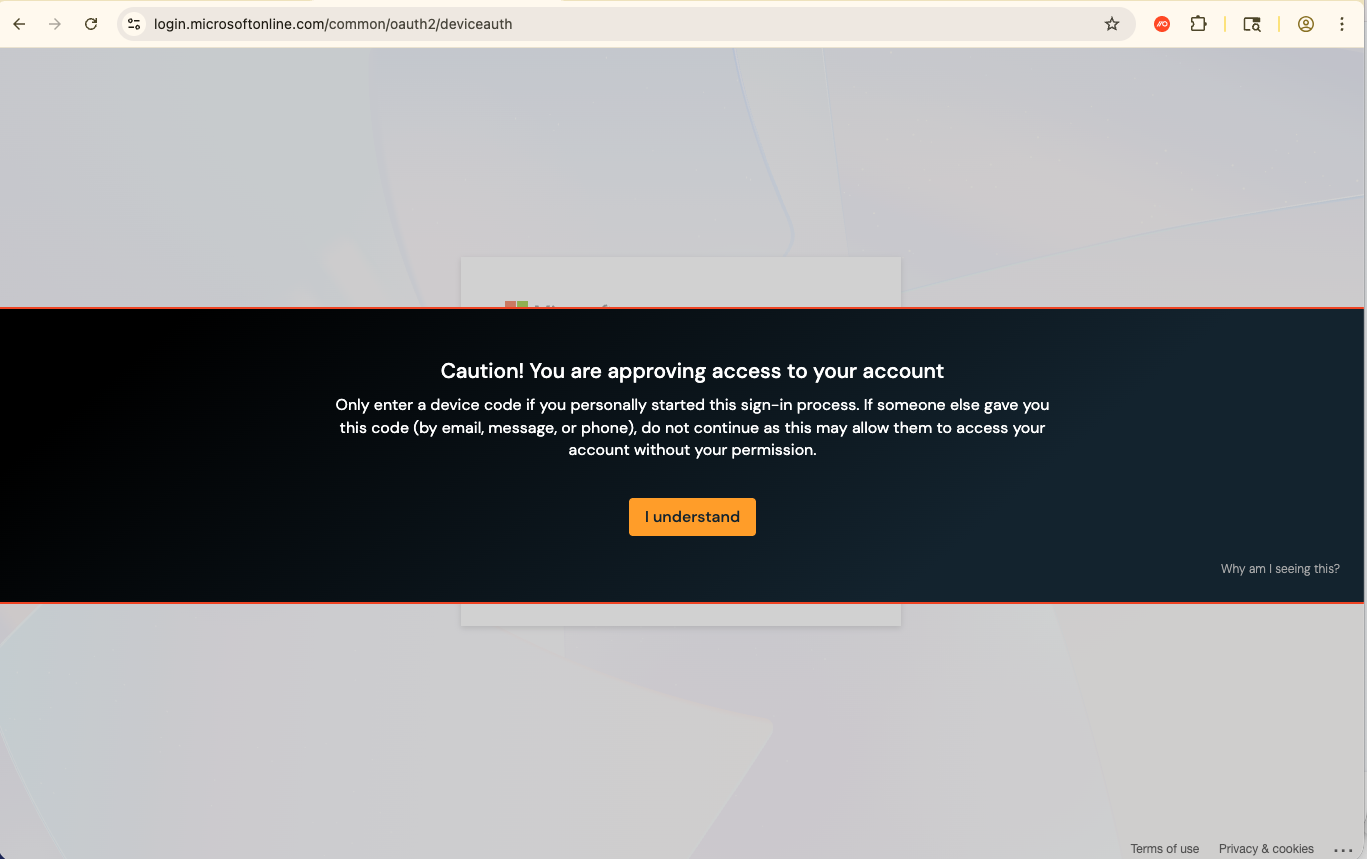
When a user visits those URLs, Push will also emit a webhook event that the banner was shown and acknowledged. If a user opts to proceed, you can treat this as a high-fidelity alert for your security team to investigate, providing app-agnostic telemetry that may not already be provided in your logs from that particular vendor. You can also simply use Push to block users from accessing device login pages if you’re confident that disruption won’t be caused.
Learn more about Push
Push Security's browser-based security platform detects and blocks browser-based attacks like AiTM phishing, credential stuffing, malicious browser extensions, ClickFix, and session hijacking. You don't need to wait until it all goes wrong either — you can use Push to proactively find and fix vulnerabilities across the apps that your employees use, like ghost logins, SSO coverage gaps, MFA gaps, vulnerable passwords, and more to harden your attack surface.
To learn more about Push, check out our latest product overview, view our demo library, or book some time with one of our team for a live demo.
